

Family Resources
School Calendar | Alta Open App (Gate Access) | 1Core Family App | School Lunch | Parking, Drop Off & Pick Up
School Calendar
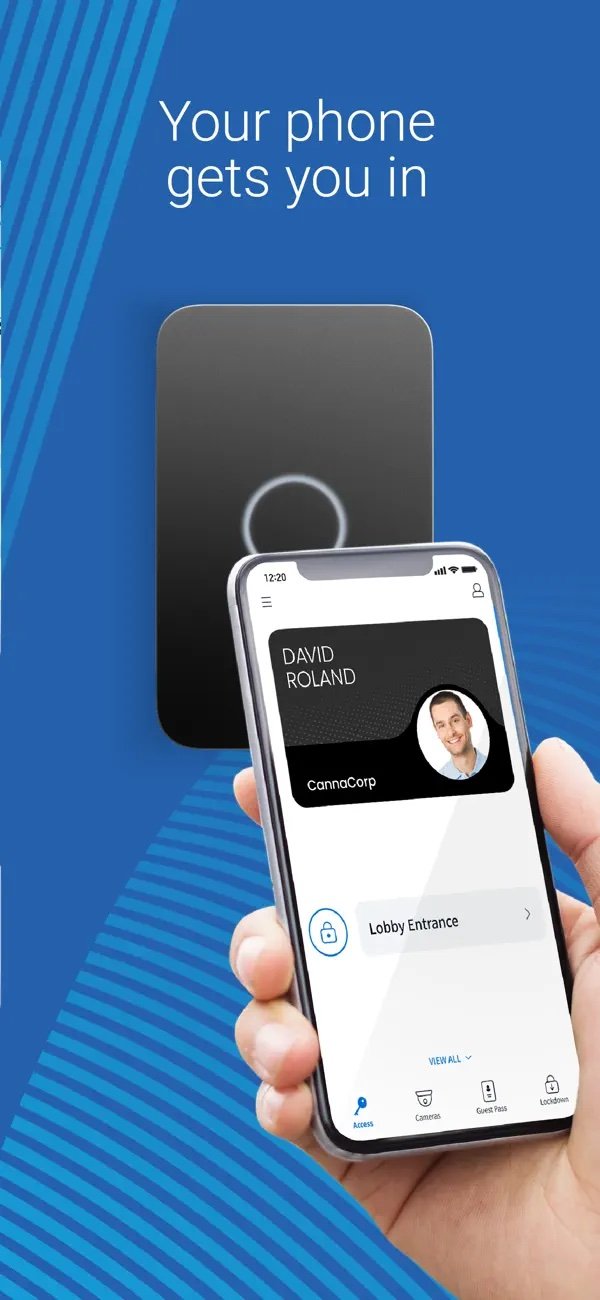
Avigilon Alta Open App
In order to enter through our access gates, please follow the instructions below:
1) Download the app.
2) Activate your account
Enter in the email address you have on file with WHPS in 1Core or submitted in our Authorization Request form.
You will receive an email from Avigilon Alta with the subject, “Activate your mobile key for WH Private”. Click on the blue “Set up on Phone” button.
3) Set up your app. Accept the prompts to turn on Bluetooth, Location Services, and Wave To Unlock features or the app might not properly work at the gate.


Online Parent Portal & Mobile App (1Core)
Features include:
Sign in /out (app only)
Pay tuition & print account statements
Manage/update who is an “Authorized Pickup” for your child
Update your family’s information and your child's information.

School Lunch Program
You have the option of either sending a lunch to school each day or purchasing lunch through one of our two campus' online lunch programs (see below):

Choicelunch
Flyer
Choicelunch offers nutritious and tasty lunches that include:
• Chosen hot or cold entrée (Regular or Large)
• Choice of seasonal fresh fruit & vegetables
• Choice of a snack
• Choice of cold drink
How to Register
To sign up, please go to www.choicelunch.com
Search for "Woodland Hills Private School." Select your campus (Collins St. or Oxnard St.)
Order Deadlines


Bright Belly
Bright Belly uses high quality ingredients for their kid-friendly, balanced meals. They focus on sourcing all Certified Organic fruits & vegetables, providing meats/dairy free from antibiotics or hormones, and avoid using any artificial ingredients or preservatives. Gluten Free, Vegan and Vegetarian meals available.
How to Register
To sign up, please go to: https://brightbelly.boonli.com/login and enter “bright3” as the password.
Choose “Order for Others” and create profiles for each child, choosing the appropriate school location and group for each profile.
Make sure to check out after placing your order and receive confirmation – many times parents forget to complete order.
Order Deadlines
Orders can be placed or cancelled up until 4 am the same day of service. You can also order in advance. If you need to place a late order after the 4 am cut off but before 8:30 am, please call us at 850-370-1211, and we will do our best to accommodate you.
Packing Lunch
We encourage families to send a healthy, nutritious meal appropriately sized for their child’s age. Please do not send candy to school in lunch boxes. We are unable to heat, microwave, or refrigerate any lunch items sent from home.
Emergency Lunches
There is a very limited number of emergency lunches available each day. Please remember to order your child’s lunch in advance to ensure that lunchtime will be hassle-free.
Parking, Drop Off, and Pick Up
Elementary Rolling Drop Off & Pick Up
From 7:30-8:00 am and 3:00-3:15pm, rolling drop-off and pick up is available for elementary students (children entering TK or older). Students must be able to independently get in/out of their car seat or booster. Parents may not get out of the vehicle.
If students have a younger sibling attending the preschool program, please park and walk the younger sibling to their classroom.
Special Events Parking
If your class has a special event, please plan to park on the street to allow the main lot to be open for visitors and families dropping off or picking up. Special events include class parties/activities, Friday elementary assemblies, etc.
Additional Parking and Traffic Information
Because we are located in beautiful, established, residential neighborhoods, we ask our families to help to follow the terms of our Conditional Use Permit from the City of Los Angeles and to help us respect the neighboring community. For the Oxnard Campus, one key measurement compliance is a limitation on the number of vehicles entering the parking lot at peak morning and afternoon times and avoiding having waiting vehicles lined up on the Oxnard street.
Families can help by taking advantage of the options below:
-
We encourage parents to take advantage of the free morning extended care which is available from 7 AM each morning. This helps reduce the impact of morning rush hour and is offered for your convenience.
-
Carpooling is the best method for reducing the number of cars entering or exiting the School. So we strongly recommend parents form carpools with other families. We recommend getting to know other families in your child’s class and considering any potential carpool options. We also encourage families to come to school events all in one vehicle.
-
To reduce traffic congestion, the elementary school day begins at at 8:00 AM and the preschool day begins between 8:45-9:15 AM depending on your child’s age.
In addition to physically reducing the number of cars entering/exiting the school, we also need to reduce the traffic impact on Oxnard Street. At no time shall cars be parked on Oxnard Street west of the campus.
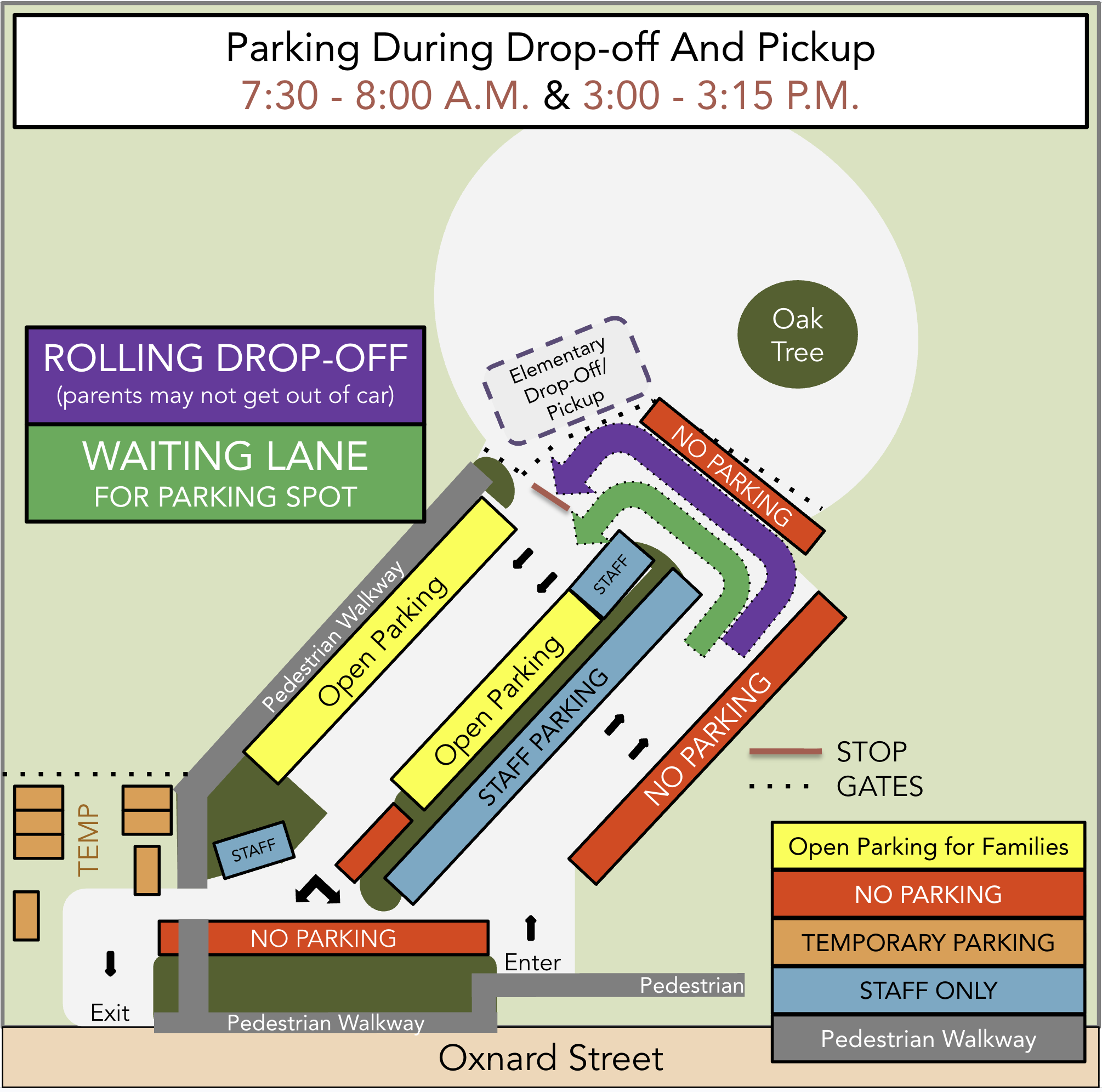
Oxnard Parking Maps
